How to Get Your Discord User Token: 3 Working Methods (2025)
Learn how to find your Discord user token using browser developer tools. Step-by-step guide with screenshots for console, local storage, and network tab methods.
How to Get Your Discord User Token: 3 Working Methods (2025)
Your Discord user token is a unique authentication key that identifies your account. Developers, researchers, and power users sometimes need this token for legitimate purposes like building custom tools, testing APIs, or running self-hosted bots. In this guide, we'll show you three working methods to find your Discord token.
Important Security Warning
Before we begin, understand these critical security points:
- Never share your token with anyone. Your token grants full access to your account, bypassing even two-factor authentication (2FA).
- If your token is compromised, change your Discord password immediately—this automatically regenerates your token.
- Only use your token for personal projects you control. Never paste it into websites or tools you don't trust.
Your token is essentially your username and password combined into one string. Treat it with the same level of security.
Method 1: Console Code Snippet (Fastest)
This is the quickest method—just paste a code snippet into the browser console.
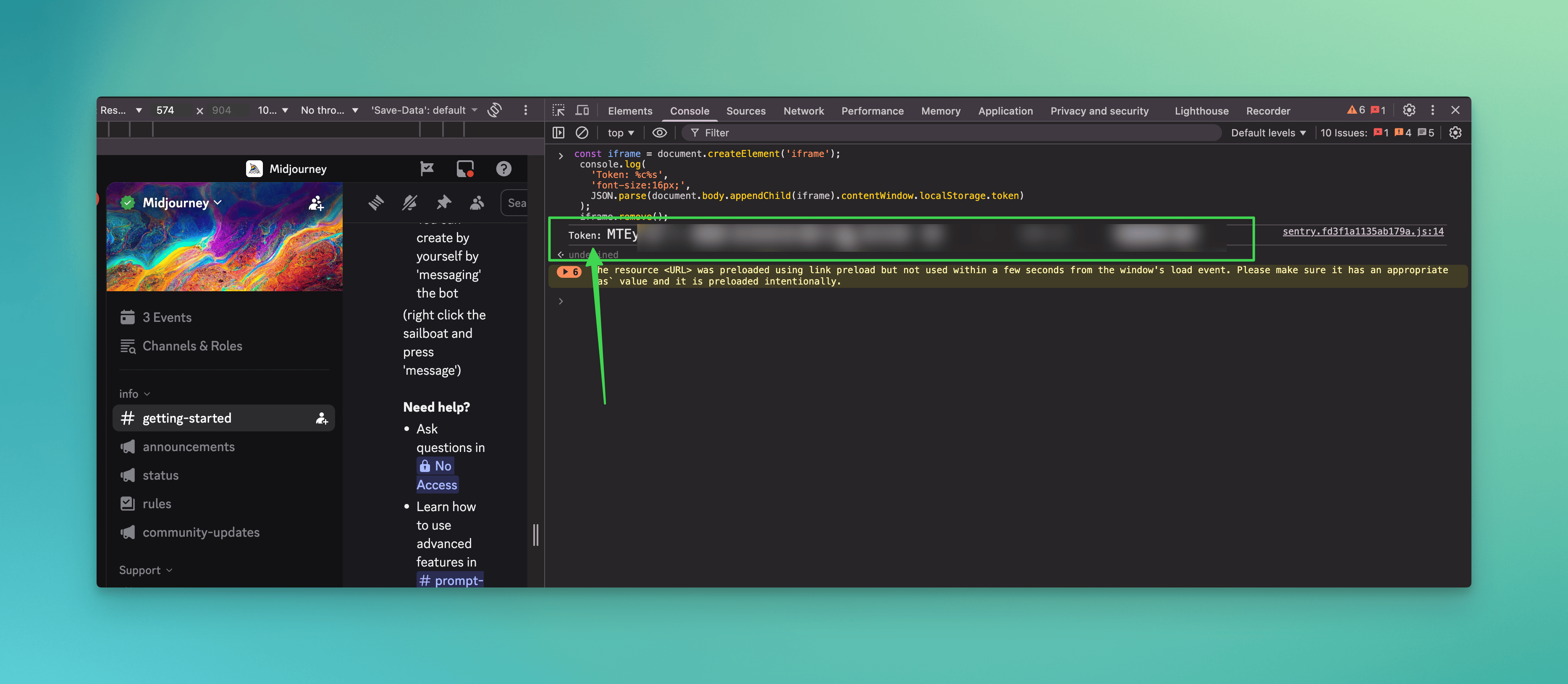
Steps:
- Open Discord in your browser at discord.com/app and log in
- Open Developer Tools by pressing
F12orCtrl + Shift + I(Windows/Linux) orCmd + Option + I(Mac) - Enable mobile emulation by pressing
Ctrl + Shift + M(orCmd + Shift + Mon Mac) - Go to the Console tab
- Paste this code and press Enter:
const iframe = document.createElement('iframe');
console.log(
  'Token: %c%s',
  'font-size:16px;',
  JSON.parse(document.body.appendChild(iframe).contentWindow.localStorage.token)
);
iframe.remove();
- Your token will appear in the console output
Why This Works
This script creates a temporary iframe to access Discord's localStorage, where your token is stored. The mobile emulation step is sometimes required for the localStorage to be accessible.
Method 2: Application Local Storage (Manual)
If you prefer not to run code, you can manually navigate to where Discord stores your token.
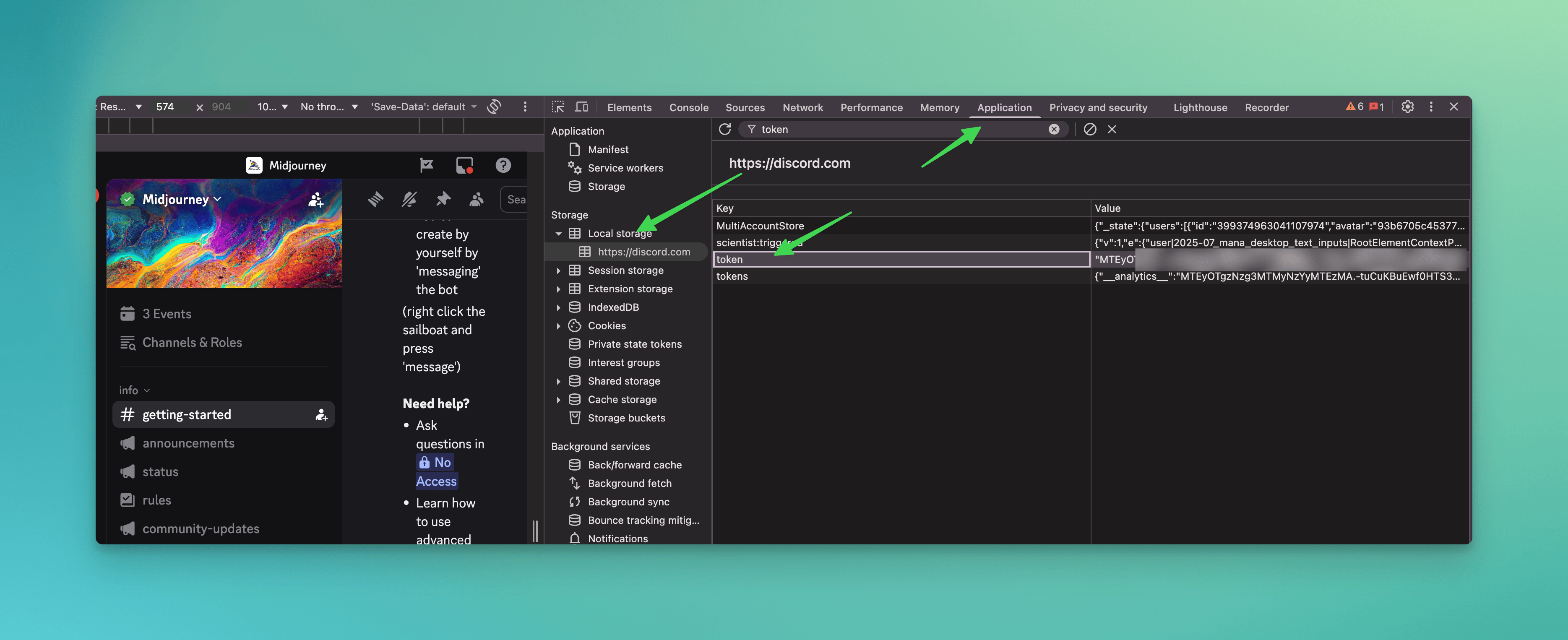
Steps:
- Open Discord in your browser and log in
- Open Developer Tools (
F12orCtrl + Shift + I) - Enable mobile emulation (
Ctrl + Shift + M) - Click the Application tab (you may need to click
>>to see more tabs) - Expand "Local Storage" in the left sidebar
- Click on
https://discord.com - Type
tokenin the Filter field at the top - Your token appears in the Value column
The token is stored as a JSON string, so it will have quotes around it. Copy the value without the surrounding quotes.
Method 3: Network Tab (Alternative)
This method captures your token from actual network requests Discord makes.
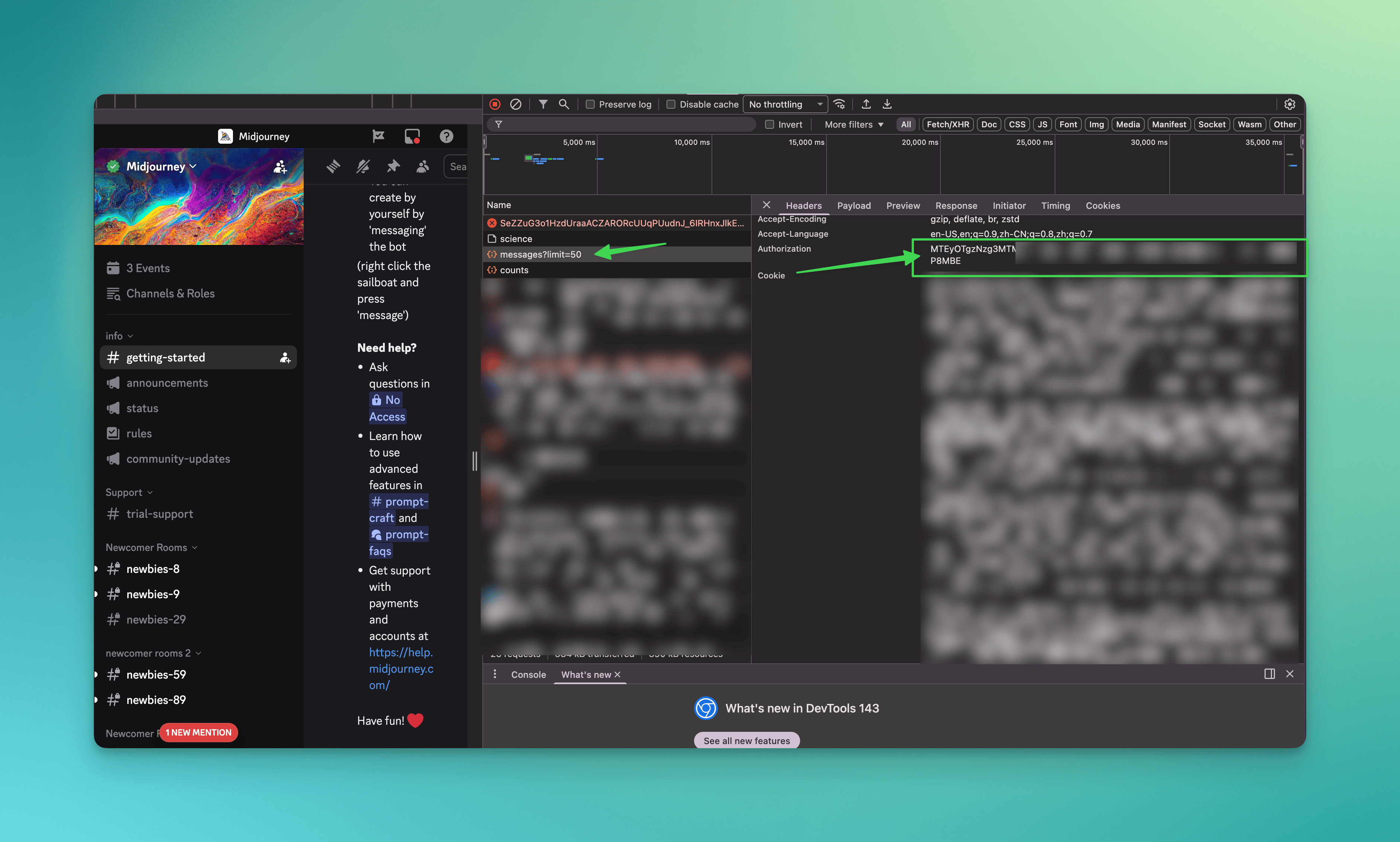
Steps:
- Open Discord in your browser and log in
- Open Developer Tools (
F12) - Go to the Network tab
- Press
F5to refresh the page - Click on any XHR/Fetch request (filter by "Fetch/XHR" if needed)
- Look in the Request Headers section
- Find the
authorizationheader—this is your token
This method works because Discord includes your token in the authorization header of every API request it makes.
Which Method Should I Use?
| Method | Speed | Difficulty | Best For |
|---|---|---|---|
| Console Snippet | Fastest | Easy | Quick one-time retrieval |
| Local Storage | Medium | Easy | Those who prefer not to run code |
| Network Tab | Slower | Medium | When other methods don't work |
We recommend Method 1 (Console Snippet) for most users—it's the fastest and most reliable.
Frequently Asked Questions
What is a Discord token?
A Discord token is an alphanumeric string that authenticates your account. Discord uses this token internally to verify your identity when you send messages, join servers, or perform any action.
Does my token ever change?
Yes, your token changes whenever you:
- Change your password
- Enable or disable 2FA
- Discord detects suspicious activity on your account
Is it safe to use my token?
Using your own token for personal projects is generally safe. The risks come from:
- Sharing your token with others
- Pasting it into untrusted websites or tools
- Storing it insecurely (e.g., in public code repositories)
Can I get banned for using my token?
Discord's Terms of Service prohibit "self-bots" (automating user accounts). While retrieving your token isn't against TOS, how you use it matters. Running automated scripts on your user account can result in account suspension.
What can someone do with my token?
With your token, someone can:
- Read all your messages
- Send messages as you
- Join and leave servers
- Access all data available to your account
- Change your profile settings
This is why you should never share your token and treat it like a password.
My token doesn't work—what happened?
If your token stops working, it was likely invalidated. This happens when you:
- Change your password
- Log out of all sessions
- Discord detected unusual activity
Simply retrieve a new token using any of the methods above.
Conclusion
Finding your Discord token is straightforward with the right tools. The console snippet method is fastest, but all three methods work reliably as of 2025.
Remember: your token is sensitive information. Keep it private, never share it, and change your password immediately if you suspect it's been compromised.
For more Discord guides and tools, check out our other articles on DiscordHunt.